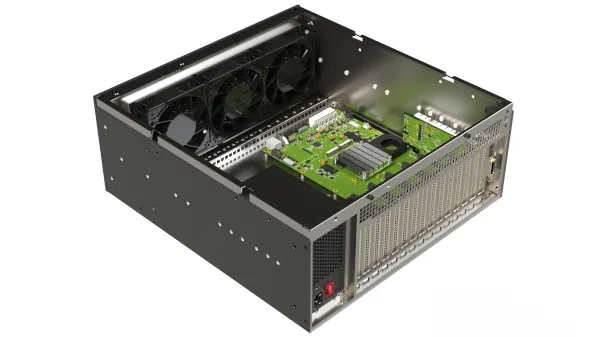
PCIe Expansion Chassis & Backplanes
Add high-power, full-size or specialized PCIe cards without replacing the host platform or forcing every device into the computer enclosure.
System Capabilities
Additional card capacity
Add GPUs, FPGAs, frame grabbers, NICs, NVMe or instrumentation when host slots are insufficient.
Dedicated power and cooling
Place high-power devices in an enclosure designed around card spacing, auxiliary power and airflow.
Independent service access
Access add-in cards and cooling components without opening or replacing the host computer.
Configurable expansion scale
Choose passive or switched backplanes and a chassis size matched to card count and bandwidth requirements.
Technical Features
eBox 2
A 2U, 19-inch expansion chassis for PCIe 1.0–5.0 devices with an 850 W ATX supply, front-to-rear cooling and mounting for one or two passive backplanes. Supported optical configurations can place compatible I/O up to 100 metres from the host.
eBox 4
A 4U, 19-inch ATX-based platform with up to eight add-in cards, a standard 1000 W supply and front-to-rear cooling. One or two passive 2-slot, 3-slot or 5-slot backplanes can be configured; model-specific optical links extend to as much as 200 metres.
eBox 4 Pro
A switched PCIe 5.0 platform built around one or two MXB585 active backplanes. Published configurations support up to nine installed PCIe cards in total, including one or two uplink/target cards; this provides up to eight downstream x16 add-in-device positions depending on topology. Balanced dual 2400 W supplies provide 4800 W maximum output or redundancy up to 2400 W.
Passive backplanes
PCIe 5.0 passive backplanes provide one x16 endpoint slot, two x8 endpoint slots or four x4 endpoint slots behind a dedicated x16 uplink slot. Each backplane requires a compatible transparent target/uplink adapter.
Active switched backplanes
The MXB585 active PCIe 5.0 backplane supports flexible x16 slot allocation, multiple uplink arrangements and transparent or NTB operation. Firmware, chassis configuration and software determine the available multi-host functions.
Power and thermal engineering
Full-length GPUs and FPGAs can exceed slot power and cooling assumptions. Auxiliary power connectors, airflow direction, cable obstruction and sustained workload must be checked together.
Specifications
| Parameter | Unit | Value / Description |
|---|---|---|
| CHASSIS OPTIONS | ||
| eBox 2 | — | 2U 19-inch chassis, up to eight add-in cards, 850 W ATX supply and one or two passive backplanes; supported optical links up to 100 m. |
| eBox 4 | — | 4U 19-inch chassis, up to eight add-in cards, standard 1000 W ATX supply and one or two passive backplanes; supported optical links up to 200 m. |
| eBox 4 Pro | — | 4U active PCIe 5.0 platform based on one or two MXB585 backplanes; up to nine installed cards including uplink/target cards, with up to eight downstream x16 device positions depending on configuration. Dual 2400 W supplies provide 4800 W maximum or redundancy up to 2400 W. |
| Backplane choices | — | Passive two-, three- and five-slot layouts, plus active switched Gen5 platforms. |
| CARD & LINK FIT | ||
| Card mechanics | — | Full-height or low-profile, card length, single/double width and rear I/O clearance. |
| Host link | — | Transparent or NTB adapter, PCIe generation, x4/x8/x16 width and copper or optical cable. |
| Power | W | Slot power plus auxiliary 6/8/12VHPWR requirements and startup transients. |
| Cooling | — | Front-to-rear airflow, device fan orientation, pressure drop and thermal headroom. |
| OPERATIONS | ||
| Enumeration | — | BIOS MMIO resources and endpoint reset behaviour affect large multi-card configurations. |
| Hot add | — | Not inherent to a chassis. Supported SmartIO Hot-Add workflows require a compatible NTB host adapter, eXpressWare release, operating system and endpoint driver. |
| Peer-to-peer | — | Requires compatible endpoints, root complex, switch configuration, BIOS and IOMMU settings. |
| Management | — | Active platforms provide Ethernet monitoring and management; passive systems rely on adapter diagnostics. |
Applications
GPU and AI expansion
Install full-length accelerators in a dedicated powered chassis while the host remains a compact server, workstation or embedded controller.
FPGA and frame-grabber systems
Increase accelerator and acquisition-card capacity without replacing the controlling computer or redesigning its motherboard.
High-speed data acquisition
Place digitizers and protocol interfaces near sensor or test racks while centralising processing and storage.
NVMe and storage expansion
Build direct PCIe paths to external NVMe devices or storage backplanes, subject to host resource and peer-to-peer compatibility.
Medical imaging equipment
Separate high-power image acquisition and reconstruction hardware from operator systems while engineering medical safety independently.
Production and laboratory test
Improve card access, replacement, cooling and cable routing in systems that change frequently or exceed internal host capacity.
Technical reading for this system decision
Open the original Dolphin or Dolphin-partner document directly. Confirm current model and software compatibility separately for the selected configuration.
Recommended System Architectures
See how this product family fits into transparent expansion, multi-host fabrics and managed-resource systems.
Related Products
Dolphin product portfolio →
Dolphin copper and optical PCIe links using model-specific SFF, CopprLink or FireFly interfaces for rack-scale and remote I/O connectivity.

Dolphin eXpressWare software with SISCI, SuperSockets, IPoPCIe, reflective memory and SmartIO capabilities on supported systems.

Dolphin PCIe host and target adapters for transparent expansion and NTB host-to-host links across selected Gen3, Gen4 and Gen5 interfaces.