
Copper & Optical PCIe Links
Place PCIe devices where the system needs them—across a chassis, rack or equipment room—while retaining a native high-bandwidth data path.
System Capabilities
Flexible equipment placement
Position hosts, switches and expansion systems around rack layout, cooling, EMI and service-access constraints.
Distance matched to the installation
Use short-reach copper or longer-reach optical media according to the required route and supported product family.
Electrical separation options
Use optical links where galvanic separation of the data path, ground-potential differences or electrical-interference concerns make copper less suitable. Optical media does not by itself constitute certified protective or medical isolation.
Preserved PCIe transaction model
Maintain compatible endpoint drivers and PCIe semantics instead of introducing an application-level network protocol.
Technical Features
Gen5 SFF-8614 links
Four x4 SFF-8614 ports can be aggregated as x8 or x16 on supported Gen5 adapters and switches. Current passive copper assemblies are offered up to 3 metres; cable-management and sideband compatibility must match the complete adapter-and-cable combination.
Gen5 CopprLink
CDFP-based CopprLink adapters provide one dense x16 PCIe 5.0 interface for transparent expansion or NTB networking. Current supported copper links extend to 3 metres and selected fibre implementations to 50 metres; both ends must use compatible hardware and firmware.
Gen5 FireFly optical
FireFly optical adapters use MPO-connected optical engines for electrically separated, longer-reach links. Current Gen5 FireFly products support up to 100 metres, while selected Gen4 FireFly families support up to 200 metres.
Gen4 SFF-8644 links
SFF-8644 supports PCIe 4.0 copper connections up to 5 metres and active optical connections up to 100 metres across compatible host adapters, PXIe or CompactPCI Serial modules and external switches. The path negotiates to the highest common generation and width.
Gen3 installed-base support
SFF-8644, iPass and related cable families support deployed Gen3 systems. Connector compatibility alone does not guarantee matching lane reversal, clocking or sideband behaviour.
Link engineering
Passive copper is suited to short rack-level runs, while active optical provides reach and electrical separation. Bend radius, retention, airflow and service routing affect practical reliability.
Specifications
| Parameter | Unit | Value / Description |
|---|---|---|
| LINK ARCHITECTURE | ||
| PCIe generation | — | Gen3, Gen4 or Gen5 across both adapters, switches and intermediate modules. |
| Lane organisation | lanes | x4 cable links; supported products aggregate links as x8 or x16. |
| Connector families | — | SFF-8614, SFF-8644, CDFP CopprLink, FireFly optical engines and legacy iPass families. |
| Operating mode | — | Transparent host/target expansion or NTB host-to-host networking, depending on adapter pair. |
| DOLPHIN CABLE FAMILIES | ||
| PCIe 3.0 SFF-8644 | PCIe3L / MSFC | x4 CMI copper cables from 0.5–5 m; compatible AOC assemblies to 100 m for supported Gen3 SFF-8644 products. |
| PCIe 4.0 SFF-8644 | PCIe4L / MSF4C | x4 CMI copper cables from 0.5–5 m and optical assemblies to 100 m for supported Gen4 SFF-8644 products. |
| PCIe 5.0 SFF-8614 | PCIe5L | x4 CMI copper cables in 1 m, 2 m and 3 m lengths for MXH530/MXH532 and compatible Gen5 products. |
| PCIe 5.0 CopprLink CDFP | PCPR5C / PCPR5FC | x16 CDFP copper cables from 1–3 m and published optical assemblies for MXH570/MXH572. |
| FireFly MPO patch | MTFC4FF / MTFC8FF | x4 and x8 optical patch cables; published lengths reach 200 m on compatible FireFly adapter configurations. |
| Legacy iPass | IXC | x8 Gen3 copper family for IXH/PXH/MXH products listed by Dolphin. OEM status: end-of-life; retain only for installed-base service. |
| MEDIA & DISTANCE | ||
| Passive copper | — | Typical current limits are up to 3 m for Gen5 SFF-8614 or CDFP copper and up to 5 m for Gen4 SFF-8644 copper; exact support is model-specific. |
| Active optical | — | Model-specific active optical or optical-engine links extend to 50 m, 100 m or 200 m depending on generation and interface family. |
| Clocking | — | Host clock isolation, SSC and cable-link clock handling depend on the selected adapter family. |
| Sideband support | — | Cable management, reset, presence and power signalling must be compatible across the complete link. |
| INTEGRATION | ||
| Compatibility | — | Adapters, cable assemblies and target hardware must use matching generation, port width and pinout. |
| Installation | — | Observe bend radius, connector retention, airflow, optical cleanliness and service access. |
| Performance | — | Usable bandwidth depends on negotiated generation, lane width, protocol overhead and switch hops. |
| Diagnostics | — | Supported board-management tools expose link state and PCIe error information. |
Applications
Rack-level expansion
Connect nearby servers, switches and expansion chassis with short copper links while preserving native PCIe enumeration and driver access.
Remote instrumentation
Place acquisition, FPGA or protocol hardware closer to sensors and test racks while keeping the controlling computer in a separate service location.
Multi-rack laboratories
Use active optical links between test racks where copper distance, cable bulk or ground-potential differences make direct copper routing impractical.
Aerospace and defence integration
Connect distributed processing and I/O subsystems using optical links where electrical separation is useful; environmental qualification remains a system-level responsibility.
Medical imaging systems
Separate image acquisition or acceleration hardware from operator-side compute without claiming the PCIe link itself provides medical electrical isolation.
Accelerator and storage fabrics
Route GPU, FPGA and NVMe traffic through engineered copper or optical paths in scalable compute and recording systems.
Technical reading for this system decision
Open the original Dolphin or Dolphin-partner document directly. Confirm current model and software compatibility separately for the selected configuration.
Recommended System Architectures
See how this product family fits into transparent expansion, multi-host fabrics and managed-resource systems.
Related Products
Dolphin product portfolio →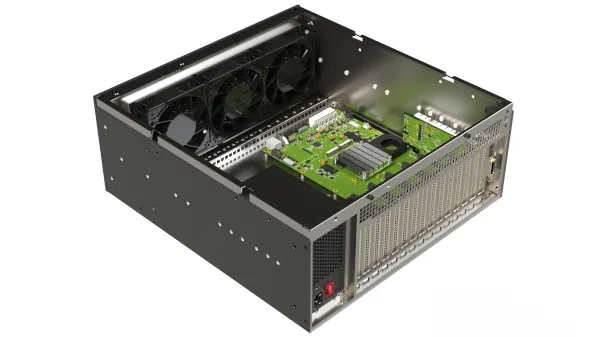
PCIe expansion chassis and backplanes integrated with compatible Dolphin adapters and switches for external GPUs, FPGAs, storage and instrumentation.

Dolphin eXpressWare software with SISCI, SuperSockets, IPoPCIe, reflective memory and SmartIO capabilities on supported systems.

Dolphin PCIe host and target adapters for transparent expansion and NTB host-to-host links across selected Gen3, Gen4 and Gen5 interfaces.